 Identifies all malware.
Wuzzup is a handy piece of software designed to find unknown threats in your machine by positively identifying every executable. Unknown executables are immediately transmitted to our lab for free analysis. Boasts highest detection rate of any product. Checks registry, running processes, autostart locations, cookies, too. Smallest footprint of any AV product. Self-updating. Very, very fast. Compatible with all AV products. Free!
Developed by pioneers in the anti-virus and anti-spyware industry, Wuzzup was developed to solve a growing problem: malware is now emerging at a rate of about 2,500 new products a day (see http://bugbopper.com/Support/KnowledgeBase/GrowthOfMalware.asp) and our products are not keeping pace. The average scanner only detects about 62% of malware files, no product detects more than about 80%, and less than 1% of all malware is detected by all products (see http://bugbopper.com/Support/KnowledgeBase/DetectionErrors.asp). Due to its different design, Wuzzup can identify everything -- because every unknown file is carefully analyzed before pronouncing it "ok".
You will find that Wuzzup runs far faster than your other anti-virus products, yet uses less memory and a smaller footprint on disk.

Temporarily disable a handful of common malware, spyware and virus processes

Developer: NoVirusThanks.org Software | More programs
License / Price: Freeware / FREE
Size / OS: 1.2 MB / Windows All
Last Updated: May 27th, 2010, 16:30 GMT [view history]
A simple antivirus solution for your PC.
NoVirusThanks Malware Remover is an application designed to detect and remove specific malware, trojans, worms and other malicious threats that can damage your computer. It includes also the ability to remove rogue software, spyware and adware.
Scanning time is very fast and does not use or need much memory even with other high-resource programs are running. Give NoVirusThanks Malware Remover a try to see what it's really capable of!
Here are some key features of "NoVirusThanks Malware Remover":
· Accurate Disinfection Method
· Remove Rogue Software and Unwanted Applications
· Remove Trojans, Spyware and Worms
· Quick Scan and Full Scan
· Scan Processes
· Scan Modules
· Scan Registry
· Backup of Files and Folders
· Fast Scanning
· Easy to use
· Manual Update of Database
· Multilingual
What's New in This Release: [ read full changelog ]
· (added) Option to update Database before scan
· (added) Option to use paranoid scan
· (added) Run / Reboot PC / Shutdown PC in Main Menu
· (added) New backup method for files/folders
· (added) Delete Tab on Settings
· (added) Use aggressive deletion
· (added) Create System Restore Point before delete files
· (added) Alert if creation of Restore Point fails
· (added) Enable System Restore if it is disabled (registry)
· (added) Scan processes / modules / registry as option
· (added) Updated DB to version 373
· (added) Romanian translation
· (fixed) Kill processes with DOS path
· (fixed) Kill protected processes
· (fixed) Remove of infected files under the "WARNING" value
· (fixed) Scanning of specific files
· (fixed) Check for report
· (fixed) "Out of system resources" when backup of certain files/folders
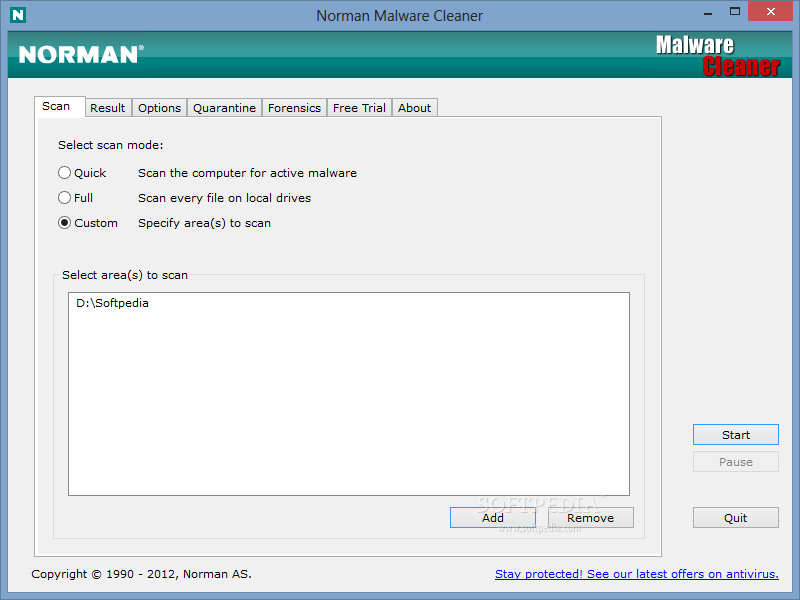
Norman Malware Cleaner is a Norman program that can be used to detect and remove specific malicious software (malware).
Note that it should not be used as a substitute for running normal proactive antivirus protection, but rather as a reactive tool to handle systems that are already infected.
By downloading and running Norman Malware Cleaner it will clean an infected system completely:
- kill running processes that are infcted
- remove infections from disk (including ActiveX components and browser helper objects)
- reveal and remove rootkits
- restore correct registry values
- remove references created by malware in hosts file
- remove windows firewall rules for malicious programs
Note
To give Norman Malware Cleaner the best working conditions possible, we recommend that you start the computer in Safe mode before running the program.
To do this, tap the F8 key on your keyboard during startup, before Windows starts, and select Safe mode from the menu that appears.
Pressing the F8 key at just the right time may be a little difficult (after the firmware POST process completes, but before Windows displays graphical output). If the F8 method does not work, repeat the procedure, but press the F8 key more quickly, or press it several times.
On some (older) computers, the F8 key method may not work. In these Windows versions you may also configure your computer to start in Safe mode through the System Configuration Utility (msconfig).