Defraggler differs from other defrag tools on the market, by enabling you to quickly and simply defrag the files you want to, without having to process the whole drive.
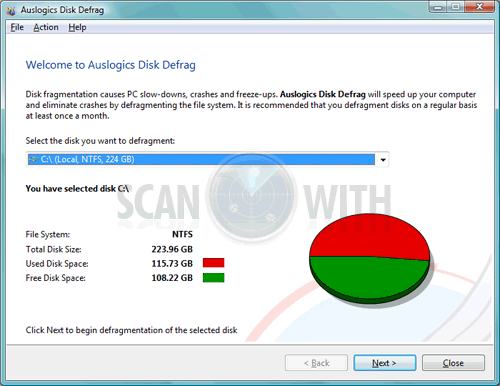
Disk fragmentation leads to system slowdowns, PC crashes, slow startup and shutdown and sometimes to system failures. Auslogics Disk Defrag is designed for fast optimization of today's modern hard disks.
Get the maximum performance out of your expensive hardware investments. And it's absolutely FREE.
Auslogics Disk Defrag is a compact, manual defragmentation tool that supports FAT 16, FAT 32, and NTFS (with compressed and encrypted files). For the individual user, Disk Defrag is more than adequate for the job of maintaining high-level disk performance.
Why Defragment Disks ?
Hard disks are by far the slowest component in your computer. CPU and memory work much faster than hard disks because they do not have moving parts. Therefore fragmented disks often become a bottleneck of the system performance.
Besides causing slowdowns, fragmentation makes the hard drive disk heads move frequently when reading files which leads to freeze-ups and system crashes. It is important to keep your disks defragmented and optimized as much as possible.
· Improve computer performance and stability
· Increase your productivity - no more waiting for files to open
· Defragment disks in only a few minutes
· Useful disk fragmentation map and detailed fragmentation report
· Windows XP Home and Professional, 2000/2003 and Vista supported
What's New in Auslogics Disk Defrag 3.2.0.0 :
· added new drive map display style - bars
· added an option to display access zones on the drive map
· added an option to view files located in selected blocks on the drive map
· added more detailed drive map clues
· combined scheduler and auto defragmentation in order to make performing auto defragmentation tasks easier
· now the program decides how to work with several disks simultaneously
· numerous GUI improvements for ease of use
· added an option to lock the program when computer is using battery power
· now the program displays file location on the drive map upon launch
· improved single file or folder defragmentation
· optimized defragmentation and consolidation algorithms
· improved installer, added automatic program unload when reinstalling or uninstalling the program
Puran Defrag Free Edition is a very simple disk defragmenter which will defrag the files and optimize your system, collecting all the fragments of a file and putting them together, as well as moving some frequently used files and all directories to faster disk areas. This process boosts your hard disk performance and thus overall system speed. In addition it reduces wear and tear on your hard disk, thereby increasing its life span.
Features of Puran Defrag Free Edition 7.3 :
· Puran Intelligent Optimizer - PIOZR
· Directories Consolidation for speed boost
· Optimization by Freeing Space
· Automatic Defragmentation for worry free defrag
· Boot Time Defragmentation for system files like MFT
· Low Priority Defrag for work while defrag experience
· Individual File/Folder Defrag for selective defrag
· GUI and Console Command Line Defrag Supported
· Restart/Shutdown After Boot Time Defragmentation
· File/Folder Exclusion or exclusion by wildcard facility
· Native support for 64Bit Windows
· Supports Windows Xp/2003/Vista/2008/7
What's New in Puran Defrag Free Edition 7.3 :
· Disk Check is now divided into two parts, normal disk check and full disk check.
· GUI now resizable and Disk Check now locates bad sectors and recovers readable information.
Note: Now get a professional defragmenter for your computer at no price at all. This is Puran Defrag Free Edition which is exactly the same as its commercial version except you do not need to pay for it (Free for private and non-commercial use only).
Defraggler differs from other defrag tools on the market, by enabling you to quickly and simply defrag the files you want to, without having to process the whole drive.
Simply run Defraggler, select the file and defragment in seconds. No more struggling with the Windows defragmentation tool!
Features of Defraggler 1.20 :
• Defrag Individual Files
Most defragmentation tools only let you defrag the whole drive. Defraggler gives you the power to select individual files and folders to defrag. So you can get the job done in seconds, rather than waiting for the whole drive to complete. Of course if you want to defrag the whole drive Defraggler will let you do that too.
• Compact and Portable
Defraggler was written in the same compact architecture as other Piriform products (CCleaner and Recuva). This results in a compact single EXE application, which can be copied to a thumbdrive and then used whenever you need it, without a complex installation process. The EXE itself is less than 1MB!
• Vista Support
Defraggler supports all OSs released since Windows 2000, this includes Windows 2000, 2003, XP and Vista. Although 64-bit support is not included in this version, we are working on compatibility, so it will be available soon! Additionally Defraggler supports both NTFS and FAT32 file systems.
• Locate Files on the Drive
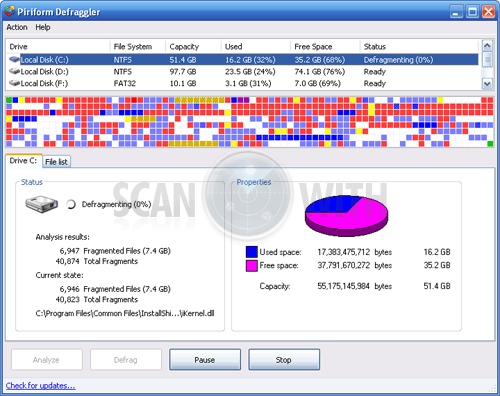
After analysis Defraggler lists all the fragmented files on the drive. Selecting one or many will highlight their location on the disk. Allowing you to visually see the location of files on the disk.
• Freeware
Why pay hundreds of dollars for a commercial defragmentation tool, when you can use Defraggler for free! This includes corporate use as well!
What's New in Defraggler 1.20.201 :
· Improved drive map updating.
· Improved 64-bit memory addressing.
· Improved Quick Defrag file algorithms.
· Improved handling of Windows styles.
· Fixed bug with MFT buffer zone.
· Added prompt on exit when long tasks are running.
· Many improvements to UI when using non-English.
· Added Georgian translation.
· Minor stability fixes.
Download[ Defraggler 1.20.201 ]Download[ Defraggler 1.20.201 - Portable ]Download[ Defraggler 1.20.201 - Slim (without toolbar) ]
Get the maximum

Auslogics Disk Defrag is a compact, manual defragmentation tool that supports FAT 16, FAT 32, and NTFS (with compressed and encrypted files). For the individual user, Disk Defrag is more than adequate for the job of maintaining high-level disk performance.
Why Defragment Disks ?
Hard disks are by far the slowest component in your computer. CPU and memory work much faster than hard disks because they do not have moving parts. Therefore fragmented disks often become a bottleneck of the system performance.
Besides causing slowdowns, fragmentation makes the hard drive disk heads move frequently when reading files which leads to freeze-ups and system crashes. It is important to keep your disks defragmented and optimized as much as possible.
· Improve computer performance and stability
· Increase your productivity - no more waiting for files to open
· Defragment disks in only a few minutes
· Useful disk fragmentation map and detailed fragmentation report
· Windows
What's New in Auslogics Disk Defrag 3.1.7.140 :
· improved defragmentation speed
· faster optimization algorithm
· fixed bugs
· added new languages
· updated languages
· improved Installer
Download [ Auslogics Disk Defrag 3.1.7.140 ]
UltraDefrag is powerful Open Source defragmentation tool for
They are three interfaces to them: graphical, console and native. The GUI is very useful, because it represents your filesystem visually as a color coded cluster map. The console is another option for those that prefer the command line. It is also allows you to run UltraDefrag from the task scheduler and scripts. Finally, the native executable will run at boot time in a manner similar to chkdsk.
The design of UltraDefrag is very simple. There are no skins, localization, or animations. It is a small and powerful program!
Features of UltraDefrag 4 :
· Very fast defragmentation, the work is done via a kernel mode driver which has an optimal defraging algorithm.
· Very small engine written in pure C.
· Nice graphical interface - compact and functional.
· Safety, because the file moving is accomplished with
· Simple to use.
· Ability to generate html reports of fragmentation status.
· Ability to include/exclude files based on simple filters.
· Native x64 support.
· Free: Distributed with full source code under the GNU General Public License.
What's New in UltraDefrag 4.3.0 :
• GUI:
· The ability to resize the main window has been added.
· Text and controls are now scaled to the current DPI settings of the screen.
· Cluster map customization is possible now through guiopts.lua configuration file editing.
· Update check was added.
• Driver:
· One little bug preventing the root directory from being defragmented fixed.
· Few bugs preventing the correct MFT displaying were fixed.
· Driver was improved to better distinguish between free space and MFT zone.
· One little bug preventing displaying system files in green color on NTFS volumes was fixed.
• Boot time interface:
· Progress indication was improved.
· Backspace and escape keys handling added to the interactive mode.
· Few bugs were fixed.
• Command line tool:
· -wait option was added to make scheduled defragmentation more flexible.
· -use-entire-window option was added.
• Scheduler:
· UltraDefrag Scheduler has been retired as a component less functional than standard Windows Task Scheduler.
• Translations:
· The following translations were updated: Czech, Finnish, Japanese, Spanish (AR), Portuguese (BR), Korean, Hungarian.
Download [ UltraDefrag 4.2.0 ]Download [ UltraDefrag 4.2.0 - AMD64 ]Download [ UltraDefrag 4.2.0 - x64 ]Download [ UltraDefrag 4.3.0 Final ]Download [ UltraDefrag 4.3.0 Final - AMD64 ]
Download [ UltraDefrag 4.3.0 Final - x64 ]
MyDefrag is a disk defragmenter and optimizer (a maintenance utility to make your harddisk faster) for Windows 2000, 2003, XP, Vista, 2008, and for X64. It is freeware, no time limit, fully functional, no advertisements.
Fast, low overhead, with many optimization strategies, can handle floppies, USB disks, memory sticks, and anything else that looks like a disk to Windows. Included are a set of easy to use scripts for endusers, a scripting engine for demanding users, a screensaver, and a combined Windows plus commandline version that can be scheduled by the Windows task scheduler or for use from administrator scripts.
MyDefrag is extremely solid because it is based on the standard defragmentation API by Microsoft, a system library that is included in Windows 2000, 2003, XP, Vista, and 2008. Most defragmenters are based on this API, including the free defragmenter that comes with Windows and many commercial defragmenters. Basically all MyDefrag does is send "move this file to that location" commands to the API. The API is part of the operating system and can safely move almost any file on the disk, without risk and while the computer is in full use.
• Defragmention
· Imagine a book split into several parts, some pages are over here, other pages in another room on another floor altogether. You will have to walk a lot when you need to read the book. It may sound silly, but this is exactly what happens to files on your harddisk. Defragmentation will put all the parts (fragments) back together, making your computer a lot faster.
• Optimization
· Imagine a big library with lots of books, spread out all over the building and not sorted whatsoever. There is an index telling you exactly where every book is, but you will have to walk a lot when you need several books. This is exactly what happens on your harddisk, the files that belong to an application can be all over the place, anywhere on the harddisk. Optimization will bring all the files together in one place, leaving the rest of the harddisk empty, and will sort the files, for example alphabetically.
What's New in MyDefrag 4.3.0 :
· Added the MoveUpToZone fileaction.
· Changed the NTFS scanner so it will now always use 512 bytes for the USA fixup. Previously it used the number of bytes per sector, which is 512 bytes for most harddisks, but it appears that NTFS also uses 512 for ultra-big harddisks, even though they have a different number of bytes per sector.
· Added some code to SelectNtfsSystemFiles() to protect the program against infinite loops in data on the disk.
· Fixed a bug that caused MoveToEndOfDisk() not to display a progress percentage.
· Changed the ExcludeVolumes setting. It can now be used multiple times in a script.
· Documented the "/TASKS" installer commandline option.
· Added the SkipBlock option to all the SortBy fileactions.
· Added the ExitIfTimeout setting.
· Added the bouncing box display mode to the screensaver.
· Added a special exclusion for the "$dcsys$" file used by DiskCryptor so MyDefrag will never move this file. The exclusion is not really needed because the file is protected by the DiskCryptor driver, but I have added it anyway, just in case.
· Changed the way how variables can be defined and changed. Previously the syntax was "NAME=VALUE", but this caused undesirable error messages in case of a syntax error. Variables can now be defined and changed with the SetVariable command.
· Several improvements in error reporting. One of these is that the regular MyDefrag version will no longer ask the user to post the debug logfile on the forum.
· The ImportListFromProgramHints fileboolean will now ignore hint files that are older than 30 days.
· Changed the contents of the "date" variable from "2010/12/31" into "2010-12-31". The old contents could not be used for filenames.
· The installer will now create a daily scheduled task by default. Previously the default was not to create the task.
· Added the "DataDiskDaily.MyD", "DataDiskWeekly.MyD", "DataDiskMonhtly.MyD", "Daily.MyD", and "Monthly.MyD" scripts. Renamed the "OptimizeDaily.MyD" script into "SystemDiskDaily.MyD", "OptimizeWeekly.MyD" into "SystemDiskWeekly.MyD", and "OptimizeMonthly.MyD" into "SystemDiskMonthly.MyD".
· The installer now creates two scheduled tasks, a daily task and a monthly task.
· Fixed a problem in the ZoneSize and ZoneBegin script variables.
Defraggler differs from other defrag tools on the market, by enabling you to quickly and simply defrag the files you want to, without having to process the whole drive.
Simply run Defraggler, select the file and defragment in seconds. No more struggling with the Windows defragmentation tool!
Features of Defraggler 1.19 :
• Defrag Individual Files
Most defragmentation tools only let you defrag the whole drive. Defraggler gives you the power to select individual files and folders to defrag. So you can get the job done in seconds, rather than waiting for the whole drive to complete. Of course if you want to defrag the whole drive Defraggler will let you do that too.
• Compact and Portable
Defraggler was written in the same compact architecture as other Piriform products (CCleaner and Recuva). This results in a compact single EXE application, which can be copied to a thumbdrive and then used whenever you need it, without a complex installation process. The EXE itself is less than 1MB!
• Vista Support
Defraggler supports all OSs released since Windows 2000, this includes Windows 2000, 2003, XP and Vista. Although 64-bit support is not included in this version, we are working on compatibility, so it will be available soon! Additionally Defraggler supports both NTFS and FAT32 file systems.
• Locate Files on the Drive
After analysis Defraggler lists all the fragmented files on the drive. Selecting one or many will highlight their location on the disk. Allowing you to visually see the location of files on the disk.
• Freeware
Why pay hundreds of dollars for a commercial defragmentation tool, when you can use Defraggler for free! This includes corporate use as well!
What's New in Defraggler 1.19.192 :
· Added queueing of multiple drives.
· New option to disable caching of drive analysis data to improve memory usage.
· Improved placement of files in Quick Defrag algorithm.
· Improved Windows 7 support.
· Lots of other small tweaks and fixes.
UltraDefrag is powerful Open Source defragmentation tool for Windows. It is very fast, because the defragmenting is done by kernel-mode driver.
They are three interfaces to them: graphical, console and native. The GUI is very useful, because it represents your filesystem visually as a color coded cluster map. The console is another option for those that prefer the command line. It is also allows you to run UltraDefrag from the task scheduler and scripts. Finally, the native executable will run at boot time in a manner similar to chkdsk.
The design of UltraDefrag is very simple. There are no skins, localization, or animations. It is a small and powerful program!
Features of UltraDefrag 4 :
· Very fast defragmentation, the work is done via a kernel mode driver which has an optimal defraging algorithm.
· Very small engine written in pure C.
· Nice graphical interface - compact and functional.
· Safety, because the file moving is accomplished with Microsoft's own Defrag API.
· Simple to use.
· Ability to generate html reports of fragmentation status.
· Ability to include/exclude files based on simple filters.
· Native x64 support.
· Free: Distributed with full source code under the GNU General Public License.
What's New in UltraDefrag 4.2.0 :
· multiple drives selection feature was added to GUI
· progress indication was improved to be more detailed and smooth
· defragmentation and optimization speedup performed
· --all, --all-fixed command line keys added to the console interface and to the boot time defragmenter
· boot time interface initialization speedup was performed
· boot time interface interactive mode commands set changed to be the same as in scripting mode
· HTML reports encoding was changed to UTF-8, which renders nicely in all popular web browsers including Internet Explorer
· plain text reports were improved to be more readable
· the following translations were updated: Dutch, Swedish, Japanese, Polish
· a bug preventing true Unicode paths from being displayed in file fragmentation reports was fixed
· shutdown confirmation dialogs were added to GUI
· one additional check preventing the boot time defragmenter from running in Windows Safe Mode was added
· one little bug causing a wrong progress bar appearance on Windows XP default theme was fixed
What's New in UltraDefrag 4.3.0 RC2 :
· UltraDefrag Scheduler has been retired as a component less functional than standard Windows Task Scheduler
· --wait option was added to the command line interface to make scheduled defragmentation more flexible
· more reliable monolithic boot time defragmenter was made
· few bugs preventing the correct MFT displaying were fixed in driver
· one little bug preventing displaying system files in green color on NTFS volumes was fixed
· cluster map appearance in GUI was improved and made absolutely independent from the screen DPI
· cluster map block size was made customizable in GUI through map_block_size parameter added to guiopts.lua configuration file
· the following translations were updated: Czech, Finnish, Japanese, Spanish (AR)
· installer was updated to include publisher, version, estimated size and support link in uninstall information
· sources were cleaned up by removing the obsolete kernel mode driver support at all
· for programmers: winx_create_thread improved, udefrag.dll interface optimized (function prototypes changed!)


